
- Identify the drawing revision and the scope of each sheet.
- Trace a proposed quantity back to its source before accepting it.
- Check whether two views describe the same material.
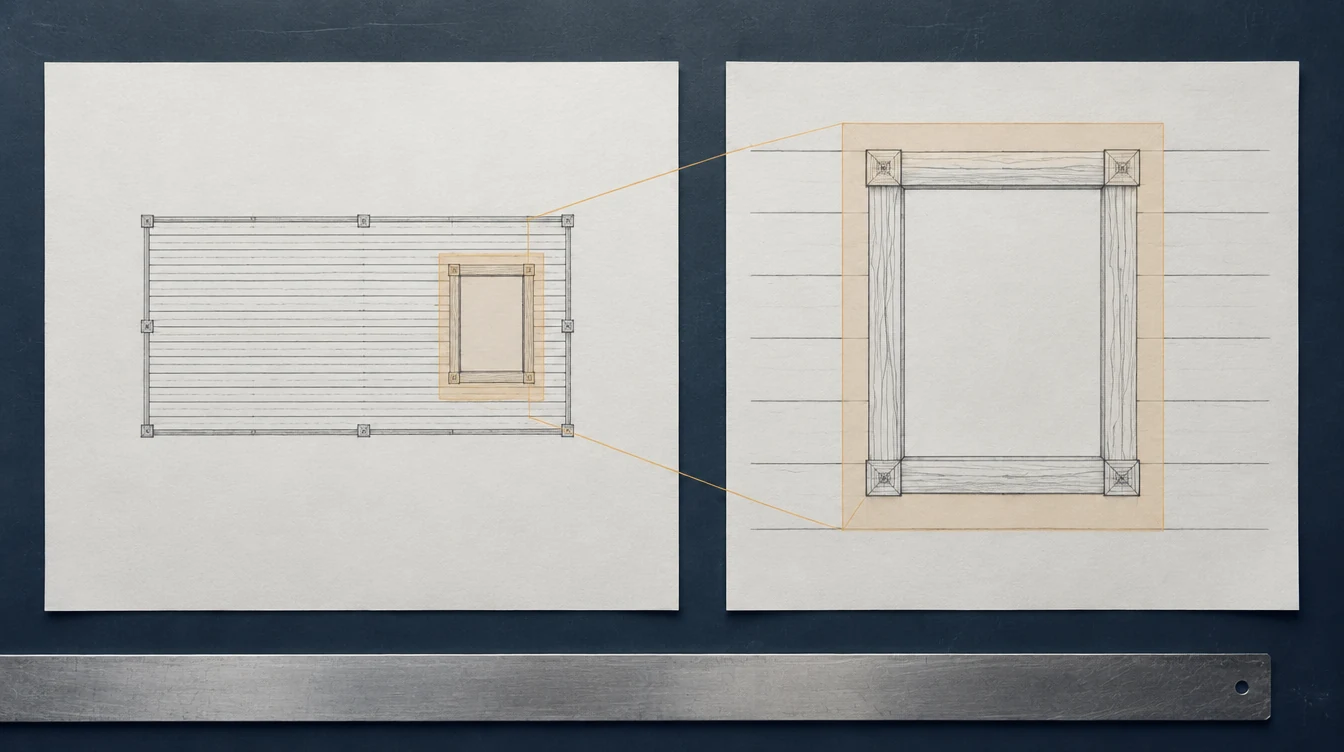
Concept illustration. The sheets are not dimensioned project documents or evidence for any quantity.
Open full-size illustration · Download imageStart with a readable, identified source
The private-project workflow accepts PDF, PNG, JPG, and CSV files with a 4 MB upload limit. Identify the document revision and scope before importing it. Retain the original document for review, particularly if you prepare a smaller extract to meet the upload limit. A fragment should still carry enough page and revision context to establish where its quantities came from.
Choose the available entry path
CSV import and manual entry are available now. AI document parsing requires the AI key to be configured before that path can run. Uploading a drawing does not, by itself, mean its quantities have been extracted. Until parsing is available, enter source-backed rows manually or import a prepared CSV, then apply the same review process to those lines.
Check every proposed line
Use the line evidence labels and textual page or region references to return to the source. These references support review; they are not exact visual highlights on the drawing. Confirm the item identity, quantity, unit, and dimensional basis. OpenAI's official vision guidance notes limitations involving small text, spatial interpretation, and counting, so an AI-produced line remains a proposal until someone checks it.
- Check whether repeated views describe the same item.
- Keep missing dimensions unresolved rather than guessed.
- Distinguish a printed count from a calculated quantity.
- Correct source references that point to the wrong revision.
Approve the reviewed record and retain an export
Projects autosave working changes. After checking the lines and resolving open issues, use reviewed approval to record the workflow decision. That status is a user review, not a claim that the software certified the design. Export CSV or use browser print for a dated handoff copy. Keep the source revision with that copy so an autosaved later edit does not obscure which quantities were shared.
Hypothetical duplicated detail
A PDF shows the same component in a plan and an enlarged detail. A draft takeoff contains a line for each appearance. The reviewer follows the textual references, establishes that both describe one component, and corrects the duplicate before approval. If AI parsing is not configured, the same issue can be checked in manually entered or CSV-imported rows.
Worked visual example
Follow one item through review.
Hypothetical exercise · this does not change a project or approve a quantity.
Source check
Two views can describe one item.
The overall plan and enlarged detail shown here refer to the same opening. A detail adds information; it does not automatically add another item to the takeoff.
| Record | Quantity | Source | Review state |
|---|---|---|---|
| Overall view | Not counted yet | Plan · O-01 | Match the item |
| Detail view | Not counted yet | Detail · O-01 | Confirm same scope |
A repeated view is a reason to check the record, not a reason to add another quantity.
Read the complete example without changing views
- Two views can describe one item. The overall plan and enlarged detail shown here refer to the same opening. A detail adds information; it does not automatically add another item to the takeoff.
- A plausible draft can count it twice. This hypothetical draft has one row from each view. Before adding the quantities, compare the item mark, location, revision and scope.
- Retain one item and both references. After confirming that the references describe one opening, the example record keeps one quantity. The second source remains attached to the review trail.
Draft: two rows, each claiming one opening. Reviewed example: one opening, with both source references retained. These counts are hypothetical teaching values, not measurements from the generated image.
Common questions
Can I use the project before AI parsing is configured?
Yes. Manual entry and CSV import are available, followed by line review, reviewed approval, and export.
Does a page reference prove the extracted number is correct?
No. It helps locate the evidence. The reviewer still needs to check the source, interpretation, units, and revision.
Evidence & limits
Reviewed September 13, 2026. Sources support their stated technical principles; this site's workflows and hypothetical examples are not product tests, supplier approvals or independently reviewed project records.